
4、企业微信设置邮箱签名
📌 重点提示:复制下方签名模板,在企业微信 邮件 → 右上角菜单 → 邮件设置 → 编辑签名 中粘贴并修改个人信息。
签名模板(请复制使用)

顺祝商祺!
张 三 (XXX部)
手 机:12345678899
电 话:0769-82708852
邮 箱:zhangsan@cloupor.com
地 址:广东省东莞市虎门镇赤岗富马路13号
网 站:www.cloupor.com
*******************************************************
本邮件仅供指定个人或公司使用,其所载内容可能含有克莱鹏科技商业信息、保密信息或其它不得披露信息。未经发件人许可任何人不得以任何形式不当使用本邮件中的部分或全部信息。如果您误收了本邮件,请您立即电话或邮件通知发件人并删除本邮件。Disclaimer
Disclaimer: This email is only for use by designated individuals or companies, and it may contain business information, confidential information or other nondisclosure information about Cloupor Technology. No one may improperly use part or all of the information in this email in any form without the permission of the sender. If you have received this email by mistake, please notify the sender by phone or email immediately and delete this email.
*******************************************************
一、选择并复制上面的签名模板-->
设置步骤
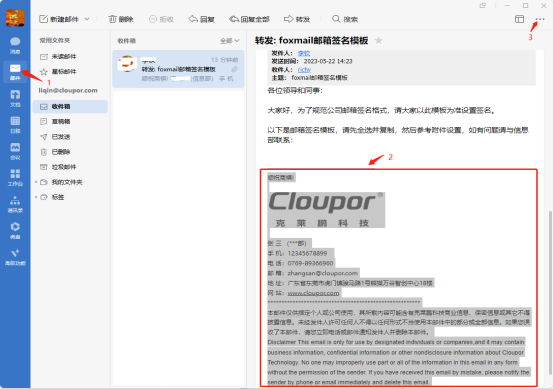
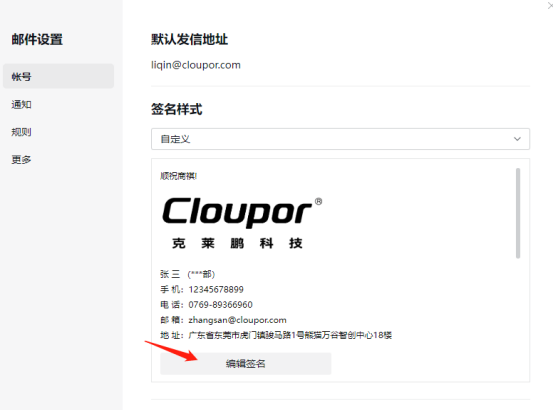
二、点击编辑签名,粘贴复制的内容到编辑窗口。
- 点击编辑签名,粘贴模板内容
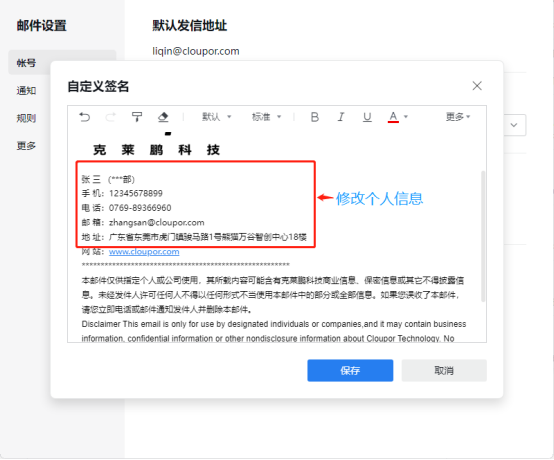
三、修改个人信息并保存。企业微信邮箱签名就设置完成了。
- 修改个人信息并保存
需要帮助?
四、如需帮助或有任何问题,请与信息部联系。如有问题请联系信息部。